From the dial-in numbers tab, you have the ability to see all dial-in numbers that are available to the Company through the subscription that they have in place.
Custom Dial-In Numbers
You will also be able to see and edit any custom dial-in numbers that have been added to the account. Editing is at this time limited to changing the status (visible/ hidden).
Custom dial-in numbers are available only to the specific company to which they are assigned and will be the numbers that carry the custom greeting.
How to Add a Custom Dial-In Number:
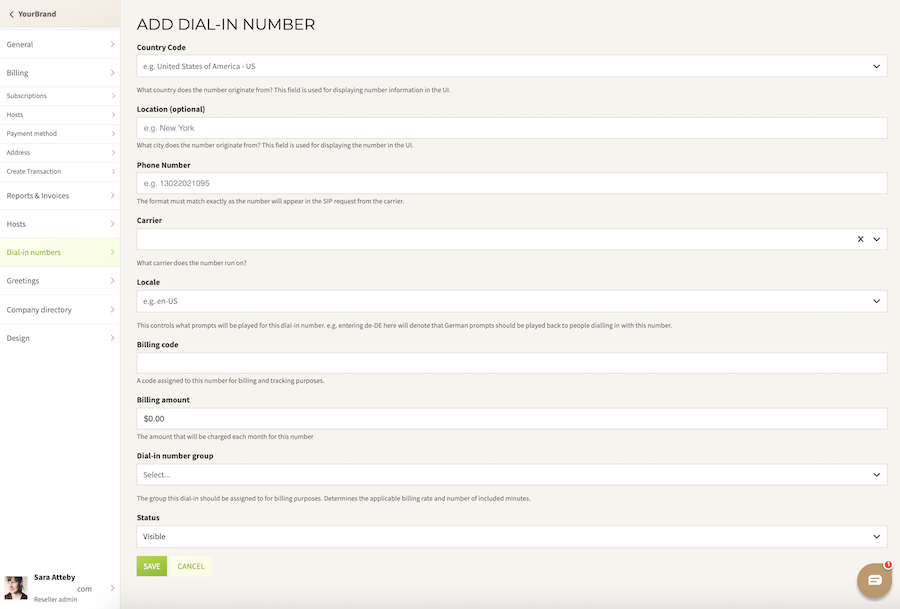
To enter a new dial-in number for a specific company, you will need to populate the following fields:
- Country Code
- Location (for example, a specific city, Toll-Free, or National)
- The full number including the country code
- Carrier
Locale
Billing Code (this is an internal reference, you may leave it blank)
Billing Amount
If you would like to charge an additional monthly fee for this number only - this does not affect the Subscription rate
Dial-In Number Group
The number must be associated with one of your dial-in number groups, and those groups must belong to the company’s plan in order for this number to work correctly
Status
Select the visibility of the number. You can hide the number from the company’s UI by selecting ”Hidden” and change the status to "Visible" by editing the number at a later time.
Save the record, and the number will appear on the list of company dial-ins.
Was this article helpful?
That’s Great!
Thank you for your feedback
Sorry! We couldn't be helpful
Thank you for your feedback
Feedback sent
We appreciate your effort and will try to fix the article