Your privacy and security are important to us. It is a focus of our company to ensure your conferences and personal data are kept secure throughout every step, from account creation, to payment details and of course during and after conference calls.
Moderators have multiple tools at hand to ensure privacy and security is maintained during a conference.
Participant list:
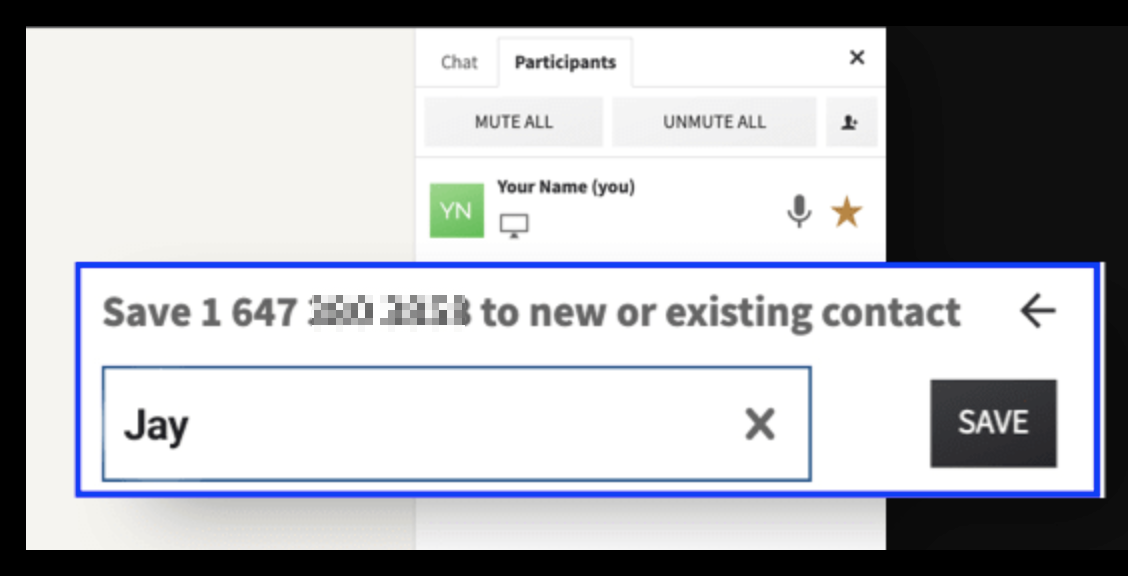
- Everyone in the conference is visible to via the participant list. Moderators have a full overview as
people enter and leave their conference. - Moderators can see the full phone number of participants who join via telephone and add names to create a contact in the address book, making it easy to identify who is present and also who is speaking. Learn more >>
- All entry and exit times of participants are also recorded for admins to access via the reporting section of their account. Learn more >>
Remove participants and block:
- Any moderator can select a participant from the participant list and choose to remove them from the meeting and also block someone from returning. Learn more >>

Chat and doc share access:
- Moderators can prevent participants from uploading and presenting unwanted content via the chat by choosing 'moderator only' access.
- Moderators can also remove any documents uploaded to the chat at any time during the meeting. Learn more >>
Conference Lock:
- Lock your room using *5 via phone or using the lock button in the online meeting room that is accessible via the 'settings' cog in the menu on the left.
Learn more >>
One-Time Access Codes and Security PINs:
- Protect your calls with a security code:
- Via the settings section of your account to apply to all future conference calls (existing scheduled calls would not be modified).
- Or, when scheduling a call, via 'security settings' on the first page of the scheduling option.
When enabled, all participants will be required to enter the access code and this security code to join the call. This is useful if you want to have one particular meeting that is private. The security code can be changed as and when you like.
Learn more >>
Delete Data:
- Conference summaries can be deleted at any time by a moderator, removing all history, including recordings and files shared.
- Individual recordings or uploaded files can also be removed separately while retaining the basic conference attendee information.
Access code and moderator PIN:
The access code and also moderator PIN can be changed at any time. If you are at all concerned about who has access to your codes - if a company employee leaves for example, or if details were shared with someone who should not have access - then resetting the code or PIN via your settings will change your conference details for ALL future conferences. Anyone using an old code or PIN would no longer be able to access your conference calls.
Encryption:
Media is encrypted from all participants to our server. The media is decrypted on our server so it can be processed and encrypted again before being sent to the other participants. Only 2 person point to point calls typically are encrypted end to end. Most video conferencing services will decrypt the media so it can be processed. If it was encrypted end to end we would not be able to offer other features, for example we could not allow video recordings.
Desktop app:
Our desktop app installation was verified to be secure by VeraCode as part of the PenTest run in late 2019.
Sharing your personal information:
We do not and will not sell our customer data to a 3rd party.
Guiding Principles:
Our company applies the principles and rules of GDPR to all customers, even customers outside the EU region. GDPR is widely considered the gold standard for privacy protection worldwide. While legally it only applies to EU/UK residents we believe in protecting our customer’s personal information is important regardless of their location.
Was this article helpful?
That’s Great!
Thank you for your feedback
Sorry! We couldn't be helpful
Thank you for your feedback
Feedback sent
We appreciate your effort and will try to fix the article