Remove participants who left the meeting from the BR modal
Adding a count-down timer when closing breakout rooms
Breakout room invitation popup
In the participant list, show 'In Breakout' rather than 'Left call' for participants who 'left' the main meeting because they're in a breakout room
UPCOMING FEATURE RELEASES:
May 20th: Instant Join
USER STORY: As a regular user of video conferencing from the same device and browser and using the same audio equipment, I want to be able to join my meetings faster.
Meeting hosts will be able to skip the video and audio preview screen when starting a meeting. Participants will also be given the option to skip the preview screen. Instant join settings will be added at the account level in in-call.
May 20th: Private Chat
USER STORY: As a participant or moderator, I would like to be able to send a message directly to another person in that meeting without anyone else seeing that message. I would like to be able to have multiple simultaneous chat threads taking place at the same time with different individuals.
May: Annotation on video tiles
Enable annotating on video feeds as well as screen sharing. This is very useful in field service and medical scenarios where annotating on a video feed is very helpful. Wireframes will be shared in next week’s update.
May: Screen sharing UI enhancement
Only showing the screen sharing preview to presenters when annotation is active. This should reduce issues with the infinity mirror. Wireframes will be provided in next week’s update.
June: Laser pointer for annotations
We are adding a laser pointer to our annotation tools. This will allow all participants to follow the mouse of the participant annotating. More details will be provided in next week’s update.
June: Dial-out/Call me - allows a host to call participants directly into a meeting via phone, or for a participant to be called by the application.
BUG FIXES:
Video spinners after long screen sharing session (Solved)
This week we discovered that a performance improvement to support meetings with 250 cameras was causing video spinners to occur after a participant had been sharing their screen for a long period of time (15 - 30 minutes).
We reverted the performance improvement to quickly solve the problem. We are working on a solution for the root cause so we can re-enable the performance improvement as soon as possible.
We are assessing the impact this will have on large meetings and can provide an update over the next few days.
Desktop application crashes, grey screen (Solved)
It was discovered that in some situations the desktop app would crash when the VP9 codec was being used. To solve the problem quickly we have disabled VP9 in the desktop application until next week’s deployment.
Mac OSX and Windows desktop applications are all being updated to 3.0
Next Thursday any users still using desktop apps version 2.0 will be forced to upgrade.
Next Thursday VP9 will be enabled for all desktop apps.
BUG ID
Summary
Created
Resolved
FACE-6130
Outlook calendar issues - update/cancel
08/Feb/21
06/May/21
FACE-6768
Spotlighting a participant breaks the next meeting call
04/May/21
06/May/21
FACE-5009
Screen sharing starting in error (on possible auto-recovery) (single channel)
NEW FEATURES:
GOOGLE CALENDAR INTEGRATION
Google Calendar Add-on approved by Google!
We can create your own white labeled version! Google calendar add-on setup
BREAKOUT ROOMS
UX Improvements:
Remove participants who left the meeting from the BR modal
Adding a count-down timer when closing breakout rooms
Breakout room invitation popup
In the participant list, show 'In Breakout' rather than 'Left call' for participants who 'left' the main meeting because they're in a breakout room
UPCOMING FEATURE RELEASES:
May 20th: Instant Join
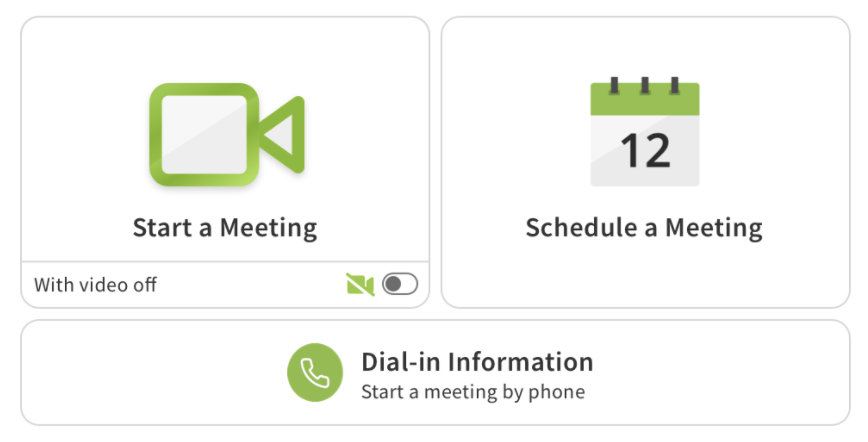
USER STORY: As a regular user of video conferencing from the same device and browser and using the same audio equipment, I want to be able to join my meetings faster.
Meeting hosts will be able to skip the video and audio preview screen when starting a meeting. Participants will also be given the option to skip the preview screen. Instant join settings will be added at the account level in in-call.
May 20th: Private Chat
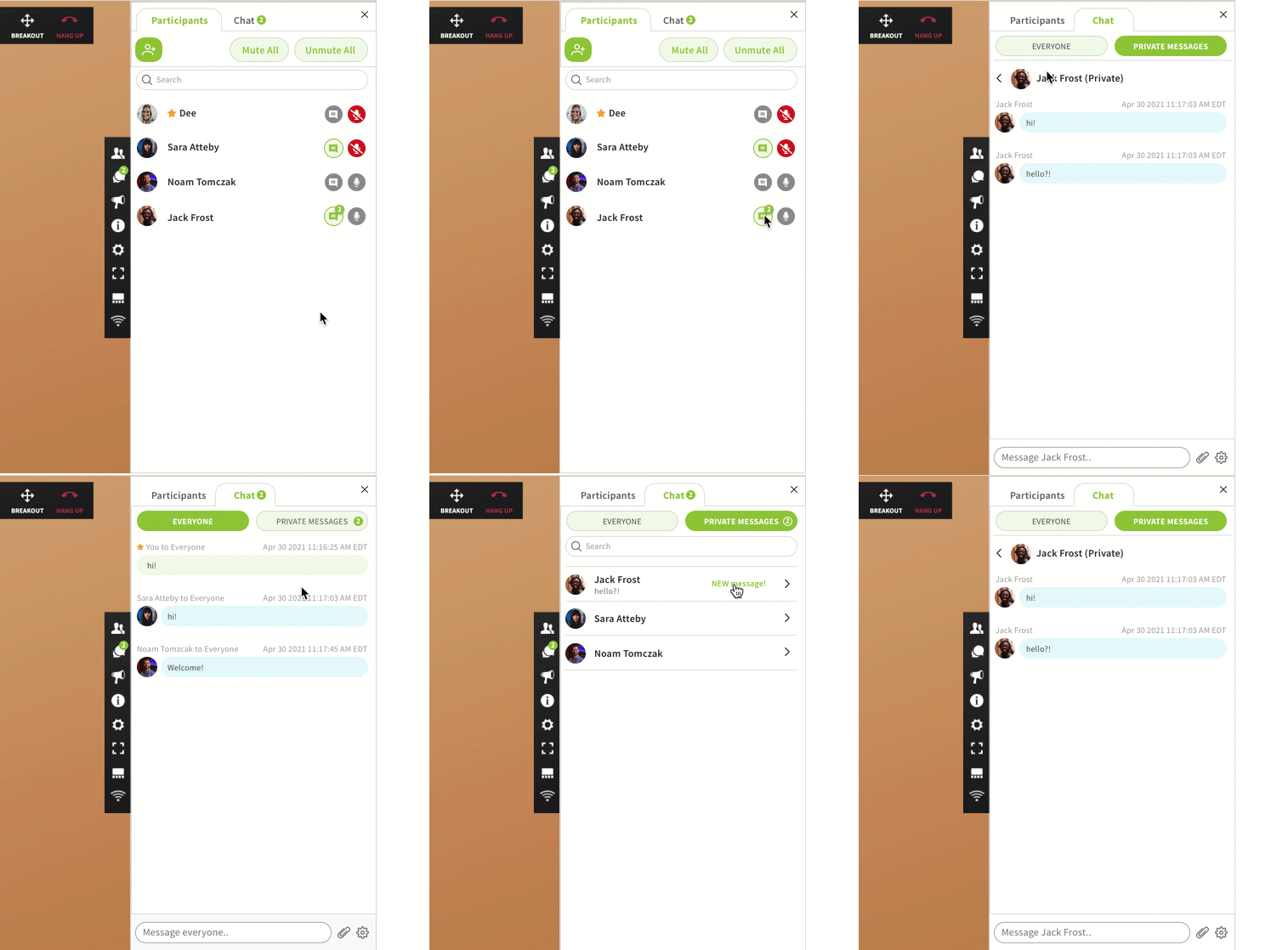
USER STORY: As a participant or moderator, I would like to be able to send a message directly to another person in that meeting without anyone else seeing that message. I would like to be able to have multiple simultaneous chat threads taking place at the same time with different individuals.
May: Annotation on video tiles
Enable annotating on video feeds as well as screen sharing. This is very useful in field service and medical scenarios where annotating on a video feed is very helpful. Wireframes will be shared in next week’s update.
May: Screen sharing UI enhancement
Only showing the screen sharing preview to presenters when annotation is active. This should reduce issues with the infinity mirror. Wireframes will be provided in next week’s update.
June: Laser pointer for annotations
We are adding a laser pointer to our annotation tools. This will allow all participants to follow the mouse of the participant annotating. More details will be provided in next week’s update.
June: Dial-out/Call me - allows a host to call participants directly into a meeting via phone, or for a participant to be called by the application.
BUG FIXES:
Video spinners after long screen sharing session (Solved)
This week we discovered that a performance improvement to support meetings with 250 cameras was causing video spinners to occur after a participant had been sharing their screen for a long period of time (15 - 30 minutes).
We reverted the performance improvement to quickly solve the problem. We are working on a solution for the root cause so we can re-enable the performance improvement as soon as possible.
We are assessing the impact this will have on large meetings and can provide an update over the next few days.
Desktop application crashes, grey screen (Solved)
It was discovered that in some situations the desktop app would crash when the VP9 codec was being used. To solve the problem quickly we have disabled VP9 in the desktop application until next week’s deployment.
Mac OSX and Windows desktop applications are all being updated to 3.0
Next Thursday any users still using desktop apps version 2.0 will be forced to upgrade.
Next Thursday VP9 will be enabled for all desktop apps.
BUG ID
Summary
Created
Resolved
FACE-6130
Outlook calendar issues - update/cancel
08/Feb/21
06/May/21
FACE-6768
Spotlighting a participant breaks the next meeting call
04/May/21
06/May/21
FACE-5009
Screen sharing starting in error (on possible auto-recovery) (single channel)
20/Aug/20
06/May/21
Attachments (1)
Google Calendar Add-on Setup.pdf
432 KB
0 Votes
0 Comments