Improved meeting summaries with sentiment analysis and Insight bar
Meeting hosts can now see sentiment analysis insights from their transcribed meetings in the summaries in their accounts.
The new ‘Insight Bar’ shows where highly positive and negative sentences were used and also where questions were asked. Hovering your mouse over each highlighted point in the insight bar will show a preview of the sentence and clicking on the point will take you directly to that part of the recording.
A ‘Sentiment’ section has also been added, showing an overall score of the tone of the meeting and a tally of positive and negative sentences.
The improved meeting summaries are included as part of any subscription that has the transcription feature and works retroactively for any existing meetings that were already recorded and transcribed.
Customer use cases include analysis of interviews during recruitment, sales meetings or staff training.
Other Improvements
Private Chat:
Add search to list of participants I can chat with
Add a back button inside a private chat conversation
Other design and UX enhancements for private chat
Custom scroll bar and UI fixes to public chat
Let the moderator/first participant know when a second person joins the meeting by playing a sound when the second participant joins
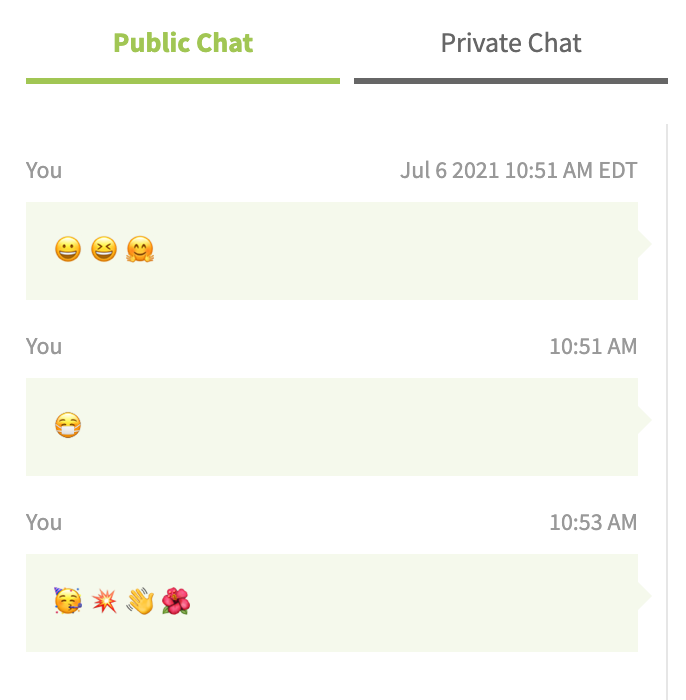
Emoji support in chat - copy and paste any emoji into the chat
Improve UI of muted alert message
BUG FIXES:
BUG ID
Summary
Created
Resolved
FACE-7106
Unified Media: Unable to record meeting with Audio only option on Unified media
30/Jun/21
06/Jul/21
FACE-7105
Unified Media: participant audio doesn't work when they join muted and then unmute (currently Safari & Firefox)
30/Jun/21
06/Jul/21
FACE-7051
Unified Media: Phone participant hears hold music when joining a Presentation meeting
22/Jun/21
06/Jul/21
FACE-7042
Unified Media: Joining using phone & pin-less entry will connect an existing view-only participant's audio
21/Jun/21
06/Jul/21
FACE-7026
Unified Media: Timer doesn't start until the second participant starts speaking
18/Jun/21
06/Jul/21
FACE-7064
Google sign-in is not working on Mobile Browser
23/Jun/21
06/Jul/21
FACE-6984
Unable to tap on 3 dots in chat when using a mobile browser
11/Jun/21
06/Jul/21
FACE-5735
Video playback stops when the alarm goes off on iPhone
16/Dec/20
06/Jul/21
UPCOMING FEATURE RELEASES:
Instant Breakout Rooms
User Story: As a teacher or instructor, I want my students to have a better learning experience by being able to quickly meet one on one with a student to demonstrate something using a video or screen share in a private ‘room’ and then easily return to the main room.
Speaker View Layout Options
User Story: During a meeting, as a participant or moderator, when someone is sharing their screen or when a speaker has been pinned/spotlighted, I want to be able to see all the content that is being shared but still see the video tiles of other participants.
Allow participants to change the viewing layout. There will now be three options (note that gallery view is the default and speaker view with tiles on left will be the default for screen-sharing/spotlight/pinning)
gallery view
speaker view (tiles on left)
speaker view (tiles on bottom)
0 Votes
0 Comments
People who like this
Delete Comment
This post will be deleted permanently. Are you sure?
v2.6.245
Release Notes:
Improved meeting summaries with sentiment analysis and Insight bar
Meeting hosts can now see sentiment analysis insights from their transcribed meetings in the summaries in their accounts.
The new ‘Insight Bar’ shows where highly positive and negative sentences were used and also where questions were asked. Hovering your mouse over each highlighted point in the insight bar will show a preview of the sentence and clicking on the point will take you directly to that part of the recording.
A ‘Sentiment’ section has also been added, showing an overall score of the tone of the meeting and a tally of positive and negative sentences.
The improved meeting summaries are included as part of any subscription that has the transcription feature and works retroactively for any existing meetings that were already recorded and transcribed.
Customer use cases include analysis of interviews during recruitment, sales meetings or staff training.
Other Improvements
Private Chat:
Add search to list of participants I can chat with
Add a back button inside a private chat conversation
Other design and UX enhancements for private chat
Custom scroll bar and UI fixes to public chat
Let the moderator/first participant know when a second person joins the meeting by playing a sound when the second participant joins
Emoji support in chat - copy and paste any emoji into the chat
Improve UI of muted alert message
BUG FIXES:
BUG ID
Summary
Created
Resolved
FACE-7106
Unified Media: Unable to record meeting with Audio only option on Unified media
30/Jun/21
06/Jul/21
FACE-7105
Unified Media: participant audio doesn't work when they join muted and then unmute (currently Safari & Firefox)
30/Jun/21
06/Jul/21
FACE-7051
Unified Media: Phone participant hears hold music when joining a Presentation meeting
22/Jun/21
06/Jul/21
FACE-7042
Unified Media: Joining using phone & pin-less entry will connect an existing view-only participant's audio
21/Jun/21
06/Jul/21
FACE-7026
Unified Media: Timer doesn't start until the second participant starts speaking
18/Jun/21
06/Jul/21
FACE-7064
Google sign-in is not working on Mobile Browser
23/Jun/21
06/Jul/21
FACE-6984
Unable to tap on 3 dots in chat when using a mobile browser
11/Jun/21
06/Jul/21
FACE-5735
Video playback stops when the alarm goes off on iPhone
16/Dec/20
06/Jul/21
UPCOMING FEATURE RELEASES:
Instant Breakout Rooms
User Story: As a teacher or instructor, I want my students to have a better learning experience by being able to quickly meet one on one with a student to demonstrate something using a video or screen share in a private ‘room’ and then easily return to the main room.
Speaker View Layout Options
User Story: During a meeting, as a participant or moderator, when someone is sharing their screen or when a speaker has been pinned/spotlighted, I want to be able to see all the content that is being shared but still see the video tiles of other participants.
Allow participants to change the viewing layout. There will now be three options (note that gallery view is the default and speaker view with tiles on left will be the default for screen-sharing/spotlight/pinning)
gallery view
speaker view (tiles on left)
speaker view (tiles on bottom)
0 Votes
0 Comments