Meeting Layout 2.0 - improvements to in-call controls
Released to all subscriptions on all partner instances on March 4th
Improve recording button UI
Opening a new popover will close others
Respect OS level dark theme
Add media chevron next to mute and video buttons to access audio and video settings
Match Left side speaker view background colour with main window background
Minor UI tweaks
UX Improvements
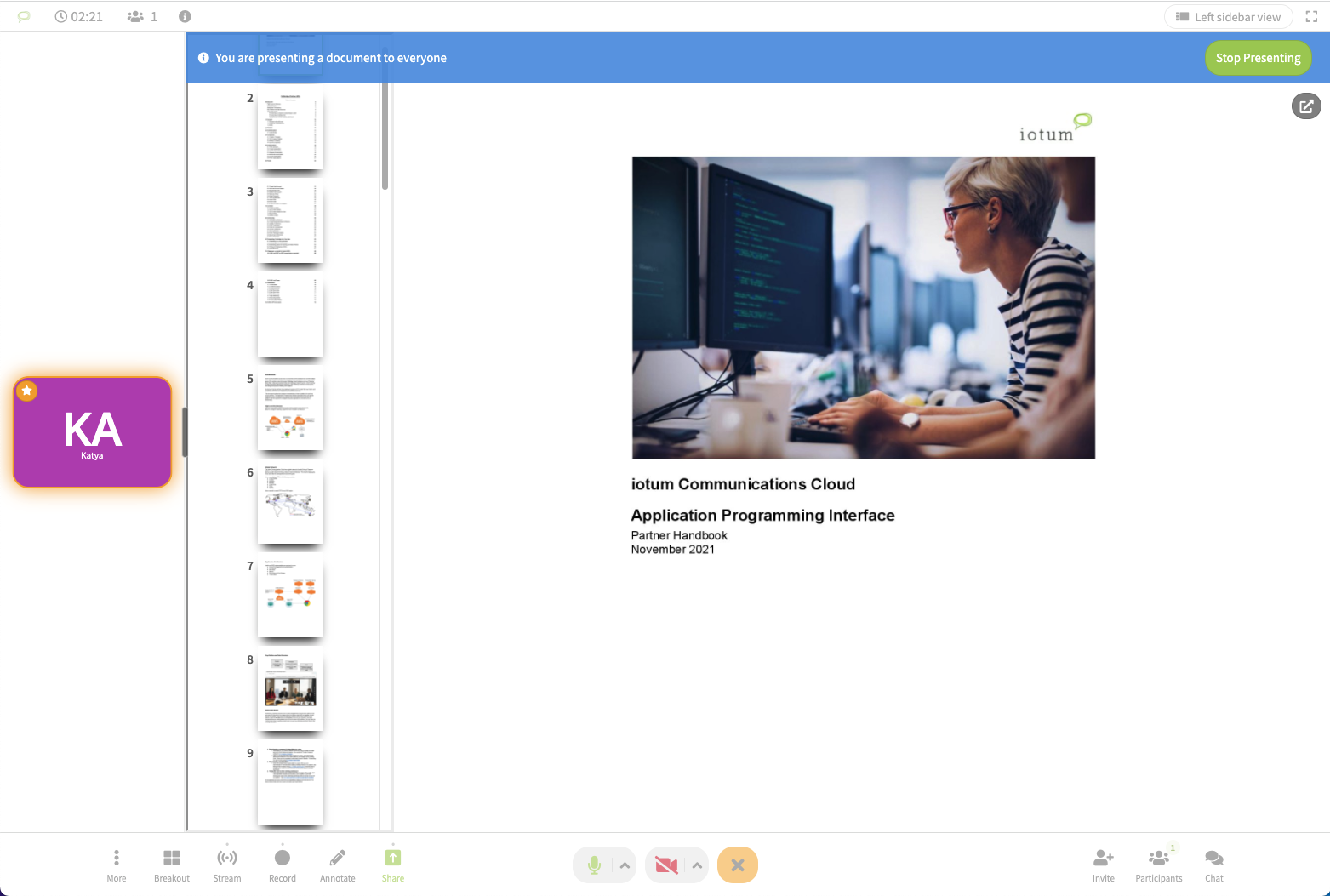
Add TOC (Table of Contents) when presenting files with multiple pages. This will allow the presenter to easily navigate to their chosen page with one click, rather than clicking through each page one at a time.
Left sidebar toggle covers annotation tools on mobile
Beta feature: Turn off all incoming video sources. Accessible via ‘more’ in the meeting toolbar. Allows for the user to deactivate all videos for themselves only. This is useful if you might be using mobile data and want to avoid using a lot of bandwidth. Or when you have a poor internet connection and want to improve the audio quality and prevent yourself from dropping out of the meeting.
Livestream API Improvements
Remove ability to use participant_id to enter a stream
Auto create webhook subscription when creating an endpoint
Add chat into ICC live stream player
Hide participants tab for ICC livestream chat
BUG FIXES:
BUG ID
Summary
Created
Resolved
FACE-8325
Refactor muting/unmuting of video participants to remove delay in action
2022-02-07
2022-03-04
FACE-8242
Update partner mobile apps with correct primary colours
2022-01-26
2022-03-04
FACE-8360
Exclude /livestream from mobile deep linking (iOS only)
2022-02-10
2022-03-04
FACE-8320
Electron Forge: Use Webpack Plugin (Compile/Obfuscate Main Process JS, & Preload Script)
2022-02-07
2022-03-04
FACE-8397
joining normally to an open meeting but with media permission is denied - "unmuted" button is shown
2022-02-18
2022-03-04
FACE-8404
Presenting/share screen will change back to gallery view
2022-02-22
2022-03-04
FACE-8411
make left-sidebar view as default speaker view
2022-02-22
2022-03-04
FACE-8455
2nd cam fails silently when media permissions are not granted (skip join, permission denied, etc.)
2022-02-28
2022-03-04
UPCOMING FEATURE RELEASES:
Active speaker while presenting - Scheduled to deploy as a ‘hotfix’ March 8th
A new view that will allow participants to only see the presented content and the active speaker's video tile. All other video tiles will be hidden.
The new view type will be called Active Speaker and this will be the default when someone presents content in Q&A and Presentation Modes. Regular speaker view will remain for Conversation Mode meetings.
Smarter Gallery View Ordering
To ensure we are in line with other major meeting platforms, we will make sure that people who have spoken remain on the first page after they finish speaking
Currently on Calbridge the active speaker only appears on the first page while they are speaking but then is demoted back to whatever page they started on. With this update,
0 Votes
0 Comments
People who like this
Delete Comment
This post will be deleted permanently. Are you sure?
v2.6.262
Release Notes:
Meeting Layout 2.0 - improvements to in-call controls
Released to all subscriptions on all partner instances on March 4th
Improve recording button UI
Opening a new popover will close others
Respect OS level dark theme
Add media chevron next to mute and video buttons to access audio and video settings
Match Left side speaker view background colour with main window background
Minor UI tweaks
UX Improvements
Add TOC (Table of Contents) when presenting files with multiple pages. This will allow the presenter to easily navigate to their chosen page with one click, rather than clicking through each page one at a time.
Left sidebar toggle covers annotation tools on mobile
Beta feature: Turn off all incoming video sources. Accessible via ‘more’ in the meeting toolbar. Allows for the user to deactivate all videos for themselves only. This is useful if you might be using mobile data and want to avoid using a lot of bandwidth. Or when you have a poor internet connection and want to improve the audio quality and prevent yourself from dropping out of the meeting.
Livestream API Improvements
Remove ability to use participant_id to enter a stream
Auto create webhook subscription when creating an endpoint
Add chat into ICC live stream player
Hide participants tab for ICC livestream chat
BUG FIXES:
BUG ID
Summary
Created
Resolved
FACE-8325
Refactor muting/unmuting of video participants to remove delay in action
2022-02-07
2022-03-04
FACE-8242
Update partner mobile apps with correct primary colours
2022-01-26
2022-03-04
FACE-8360
Exclude /livestream from mobile deep linking (iOS only)
2022-02-10
2022-03-04
FACE-8320
Electron Forge: Use Webpack Plugin (Compile/Obfuscate Main Process JS, & Preload Script)
2022-02-07
2022-03-04
FACE-8397
joining normally to an open meeting but with media permission is denied - "unmuted" button is shown
2022-02-18
2022-03-04
FACE-8404
Presenting/share screen will change back to gallery view
2022-02-22
2022-03-04
FACE-8411
make left-sidebar view as default speaker view
2022-02-22
2022-03-04
FACE-8455
2nd cam fails silently when media permissions are not granted (skip join, permission denied, etc.)
2022-02-28
2022-03-04
UPCOMING FEATURE RELEASES:
Active speaker while presenting - Scheduled to deploy as a ‘hotfix’ March 8th
A new view that will allow participants to only see the presented content and the active speaker's video tile. All other video tiles will be hidden.
The new view type will be called Active Speaker and this will be the default when someone presents content in Q&A and Presentation Modes. Regular speaker view will remain for Conversation Mode meetings.
Smarter Gallery View Ordering
To ensure we are in line with other major meeting platforms, we will make sure that people who have spoken remain on the first page after they finish speaking
Currently on Calbridge the active speaker only appears on the first page while they are speaking but then is demoted back to whatever page they started on. With this update,
0 Votes
0 Comments