Access via …/conf/settings/general/answering_rules
Upgrade Audio Calls to Video — Users can now upgrade an audio call to a video meeting. (#12722)
Notification and UX improvements targeted for V2.6.370
BLF Contact Names — Busy Lamp Field (BLF) now displays contact names for at-a-glance call status. (#12930)
Improved PBX Presence Handling — Improved handling of PBX presence for more accurate status indicators. (#12943)
Org-Level BLF & Speed Dial Management — Admins can now manage BLF and Speed Dial settings at both the organization and account level. (#12966)
Access for hosts via …/conf/settings/general/blf_settings and for admins via the ‘General’ company-level settings
Country-Specific Ringing Tone — Calls now use a ringing tone appropriate to the recipient's country. (#13003)
[FIXED] Resolved an issue where rejecting an incoming second call could put the active call on hold and break two-way audio. (#12971)
[FIXED] Resolved an issue where a host could not hear the first caller after swapping back from a second call. (#13010)
[FIXED] Resolved an issue where the Windows desktop app sometimes didn't stop ringing. (#12921)
[FIXED] Resolved an issue where a caller's name could display twice on the receiver's screen during hold, when calling from the iOS or Android app. (#12912)
Chats (Beta)
Plain-Text Code Blocks — Chat content now stays as plain text inside inline and fenced code blocks. (#12893)
Updated Chat Inbox Header — Refreshed the chat inbox header and floating action button actions across mobile and desktop. (#12918)
Draft Indicator in Team Chat — Draft messages are now indicated in the Team Chat room list. (#12951)
[FIXED] Resolved an issue where chat bullet formatting could apply to the previous sentence. (#12779)
[FIXED] Resolved an issue with broken autolink rendering for pasted plain-text URLs in team chat. (#13037)
[FIXED] Resolved an issue where typing certain text could incorrectly convert the preceding paragraph into a list item. (#12988)
Mobile
[FIXED] Theme styles are not respected in the mobile app. (#13049)
Desktop
[FIXED] Resolved an issue where users were redirected to the dashboard instead of their original meeting after signing in via SSO when joining a meeting by access code. (#12758)
Bookings
[FIXED] Resolved an issue where the Disconnect button disappeared when clicking "Choose calendar to sync" on the Microsoft booking page. (#13028)
NEW UPCOMING FEATURE RELEASES: Our new roadmap layout displays a list of features that we are considering and that you can vote on. You also have the option to suggest a feature or improvement directly from this page.
iotum Release Notes
V2.6.369 Deployed July 9th, 2026
What's New
*NOTE: iOS and Android fixes/updates will require an update to the mobile apps.
Video Conferencing
[FIXED] Resolved an issue where toggling the camera or switching video input could drop the outgoing video resolution to 180p. (#13023)
[FIXED] Resolved an issue where reaction and raise hand icons could overlap on iPhone browsers. (#12932)
Calling & Softphone (Beta)
PBX User Sync — Users can now be imported and synced directly from the PBX. (#11821)
Call Answering Rules — Added configurable call answering rules for incoming calls. (#11281)
Access via …/conf/settings/general/answering_rules
Upgrade Audio Calls to Video — Users can now upgrade an audio call to a video meeting. (#12722)
Notification and UX improvements targeted for V2.6.370
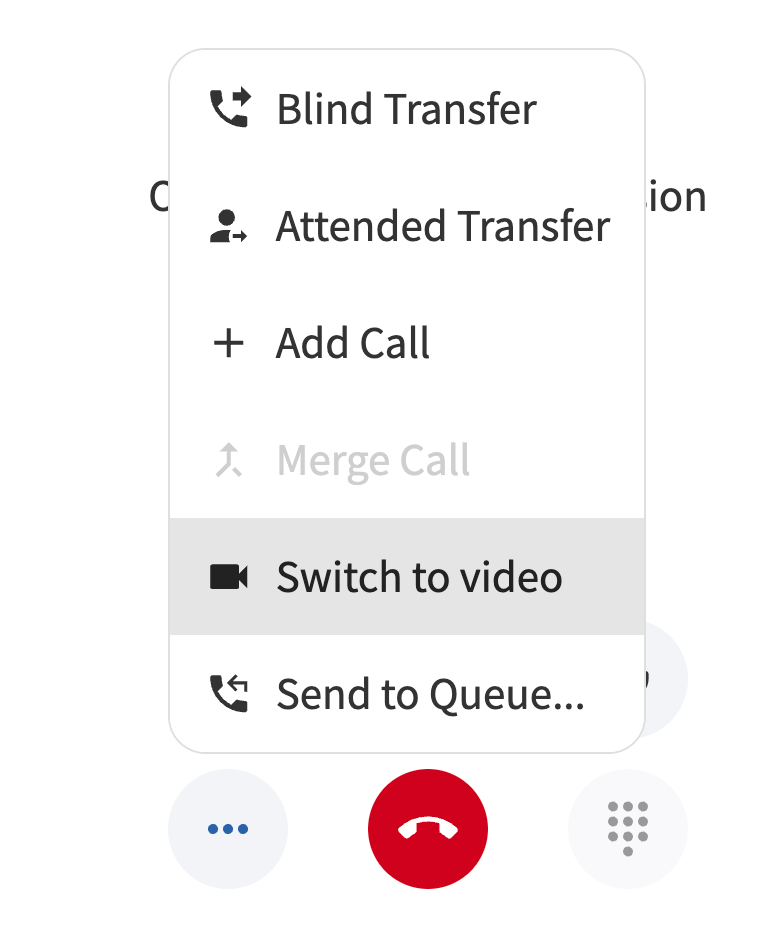
BLF Contact Names — Busy Lamp Field (BLF) now displays contact names for at-a-glance call status. (#12930)
Improved PBX Presence Handling — Improved handling of PBX presence for more accurate status indicators. (#12943)
Org-Level BLF & Speed Dial Management — Admins can now manage BLF and Speed Dial settings at both the organization and account level. (#12966)
Access for hosts via …/conf/settings/general/blf_settings and for admins via the ‘General’ company-level settings
Country-Specific Ringing Tone — Calls now use a ringing tone appropriate to the recipient's country. (#13003)
[FIXED] Resolved an issue where rejecting an incoming second call could put the active call on hold and break two-way audio. (#12971)
[FIXED] Resolved an issue where a host could not hear the first caller after swapping back from a second call. (#13010)
[FIXED] Resolved an issue where the Windows desktop app sometimes didn't stop ringing. (#12921)
[FIXED] Resolved an issue where a caller's name could display twice on the receiver's screen during hold, when calling from the iOS or Android app. (#12912)
Chats (Beta)
Plain-Text Code Blocks — Chat content now stays as plain text inside inline and fenced code blocks. (#12893)
Updated Chat Inbox Header — Refreshed the chat inbox header and floating action button actions across mobile and desktop. (#12918)
Draft Indicator in Team Chat — Draft messages are now indicated in the Team Chat room list. (#12951)
[FIXED] Resolved an issue where chat bullet formatting could apply to the previous sentence. (#12779)
[FIXED] Resolved an issue with broken autolink rendering for pasted plain-text URLs in team chat. (#13037)
[FIXED] Resolved an issue where typing certain text could incorrectly convert the preceding paragraph into a list item. (#12988)
Mobile
[FIXED] Theme styles are not respected in the mobile app. (#13049)
Desktop
[FIXED] Resolved an issue where users were redirected to the dashboard instead of their original meeting after signing in via SSO when joining a meeting by access code. (#12758)
Bookings
[FIXED] Resolved an issue where the Disconnect button disappeared when clicking "Choose calendar to sync" on the Microsoft booking page. (#13028)
New support article for the Bookings feature: https://support.callbridge.com/support/solutions/articles/42000118155
Known Issues
Video Conferencing
RSVP is not displayed in the calendar application. (#10923) (Target: V2.6.370)
Duplicate instances of recurring meetings may appear when using Google Calendar. (#11645) (Target: V2.6.370)
A host cannot unmute participants on the iOS app when a meeting is in presentation mode. (#12837) (Target: V2.6.370)
Calling & Softphone (Beta)
When a video call started from 'Contacts' is answered, other devices may keep ringing. (#12803) (Target: V2.6.370)
Chats (Beta)
No notification for messages while the app is active and in focus. (#12664) (Target: V2.6.370)
API/SDK — Link to current API documentation
NEW UPCOMING FEATURE RELEASES: Our new roadmap layout displays a list of features that we are considering and that you can vote on. You also have the option to suggest a feature or improvement directly from this page.
View the new 2026 roadmap here
0 Votes
0 Comments